
How to Cancel your Subscription
Cancelling your Subscription
If you have decided to cancel your subscription, we would love to hear why. We’re always looking to improve and we appreciate your feedback! Feel free to contact us through Easil’s Live Chat support (available by pressing the “Help” button in the top right of the screen.)
If you still want to cancel your subscription, just follow these steps:
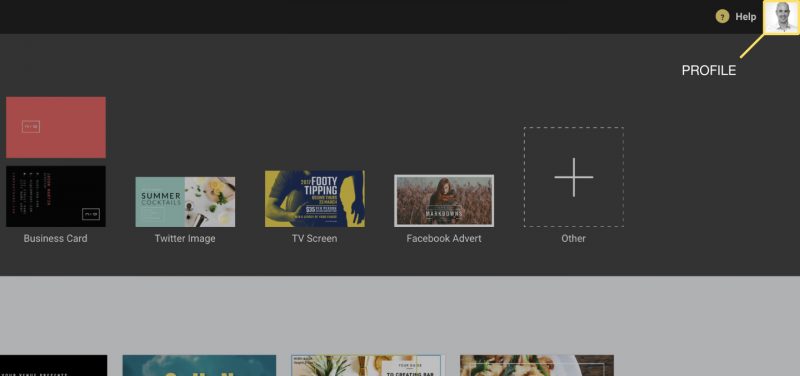
- Click on your profile located at the top right corner of your screen
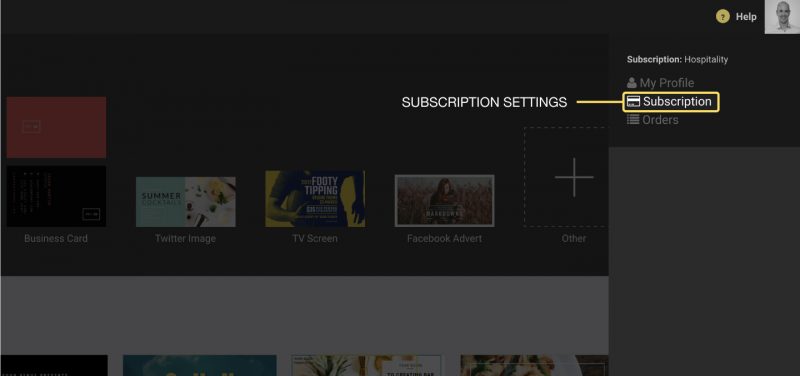
2. Click on “Subscription” on the top part of the sidebar
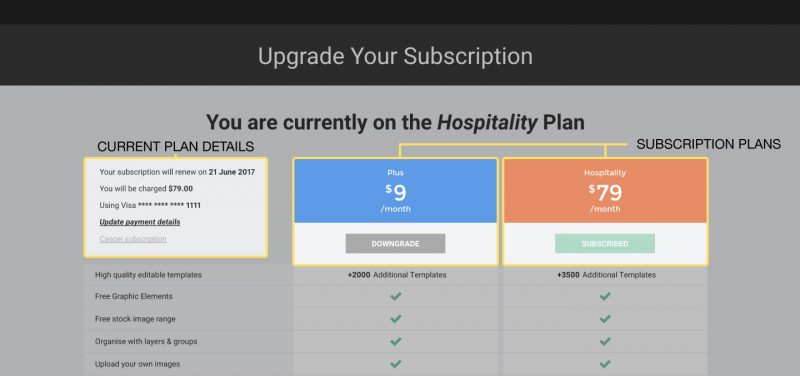
3. Cancel Subscription
On the subscription page, you will see a list of available plans, and details on your current plan & payment information.
Here, you can either switch to a different subscription, such as our Plus plan, which provides the fully-featured Easil experience at a low price point, or you can simply cancel your subscription entirely.
In the Current Plan Details section, you can edit your selected payment method, as well as see details about your subscription, such as your next renewal date.
Below this is the “Cancel Subscription” button. Once you cancel your subscription, you will still have access to all of that subscription’s features until your next renewal date. Once the remaining subscription period has ended, you will revert to our “Free” plan & lose access to any extra features of your subscription.
If you change your mind after cancelling at any point before your renewal date, return to this page and you will see a “Resubscribe” option. Pressing this will reactivate your subscription & you will be charged again on your next renewal date.